---
title: How to download SensorLink?
description: SensorLink is the software developed by Titan Logix that enables you to create and modify strapping tables for your TD Transmitters, as well as configure your FINCH II gauge. This software also provid
---
[Skip to content](https://help.titanlogix.com/how-to-download-sensorlink#main-content)
English
Show submenu for translations
[Training Request Form](https://help.titanlogix.com/kb-tickets/new?hsLang=en)
Open main navigation
Close main navigation
- English
Show submenu for translations
- [Training Request Form](https://help.titanlogix.com/kb-tickets/new)
- www.titanlogix.com
www.titanlogix.com
How can we help you?
- There are no suggestions because the search field is empty.
1. [Titan Help Center](https://help.titanlogix.com/?hsLang=en)
2. [SensorLink](https://help.titanlogix.com/sensorlink?hsLang=en)
3. [Overview](https://help.titanlogix.com/sensorlink?hsLang=en#overview)
# How to download SensorLink?
### **Overview**
SensorLink is the software developed by Titan Logix that enables you to create and modify strapping tables for your TD Transmitters, as well as configure your FINCH II gauge.
This software also provides access to new features for your Transmitters and FINCH II displays, ensuring that you can maintain optimal performance and functionality within your Titan system. These enhancements are delivered through firmware updates, which can be accessed by using the latest version of SensorLink.
Each transmitter must be programmed with the specific strapping table provided by the tank manufacturer for that compartment. Additionally, programming of the FINCH display is necessary if you are using the FINCH II-6W model or if you wish to update the default alarm settings for the FINCH II-W model.
### **Technical Requirements**
- PC computer with Windows 10 or later installed
- An available USB port or a Serial port
- An Internet connection for software installation and updates
- TD100 Programming Kit, part number SV Prog Kit
- Access to a Power outlet if programming before hardware is installed on the truck
**Download File**
Click **[HERE](https://help.titanlogix.com/hubfs/SensorLink_Installer.exe?hsLang=en)** to download SensorLink on your computer.
### Steps
**1.** After downloading the **SensorLink\_Installer.exe** link above, double-click this file on your computer.
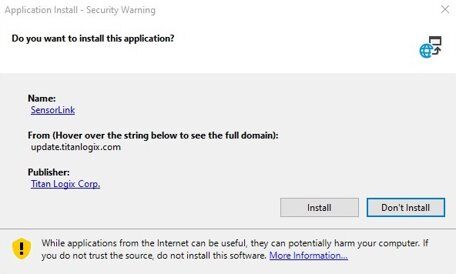
**2.** A window asking permission to install the application may pop up.
**3.** Click the **Install** button.
**4.** A new window pops up indicating the installation progress.

**5.** SensorLink is automatically launched when the installation is complete.

**Next Steps:** Refer to [Creating a Strapping Chart](https://help.titanlogix.com/how-to-create-a-strapping-table-in-sensorlink?hsLang=en)to get started with programming your Transmitters.
---
**Need more help?**
Contact one of our Titan Logix's Service Team members for more technical assistance.
**Phone:** 1-877-462-4085 (ext. 2)
**Email:** [service@titanlogix.com](mailto:service@titanlogix.com)
**Request Training:** [Click Here](https://help.titanlogix.com/kb-tickets/new?hsLang=en)
- [Troubleshooting](https://help.titanlogix.com/troubleshooting?hsLang=en#main-content)
- [Error Codes](https://help.titanlogix.com/troubleshooting?hsLang=en#error-codes)
- [Overview](https://help.titanlogix.com/troubleshooting?hsLang=en#overview)
- [Most Common Issues](https://help.titanlogix.com/troubleshooting?hsLang=en#most-common-issues)
- [Alarms](https://help.titanlogix.com/troubleshooting?hsLang=en#alarms)
- [GAUGE Issues](https://help.titanlogix.com/troubleshooting?hsLang=en#gauge-issues)
- [Relays](https://help.titanlogix.com/troubleshooting?hsLang=en#relays)
- [FINCH III Systems (Current)](https://help.titanlogix.com/finch-iii-systems-current?hsLang=en#main-content)
- [FINCH III System Overview](https://help.titanlogix.com/finch-iii-systems-current?hsLang=en#finch-iii-system-overview)
- [Step 1: Installing Hardware (FINCH III Systems)](https://help.titanlogix.com/finch-iii-systems-current?hsLang=en#step-1-installing-hardware-finch-iii-systems)
- [Step 2: Configuring FINCH III Systems](https://help.titanlogix.com/finch-iii-systems-current?hsLang=en#step-2-configuring-finch-iii-systems)
- [Step 3: Testing FINCH III Systems](https://help.titanlogix.com/finch-iii-systems-current?hsLang=en#step-3-testing-finch-iii-systems)
- [Step 4: Operating FINCH III Systems](https://help.titanlogix.com/finch-iii-systems-current?hsLang=en#step-4-operating-finch-iii-systems)
- [Feature Add-On: FINCH III LCR.iQ Integration](https://help.titanlogix.com/finch-iii-systems-current?hsLang=en#feature-add-on-finch-iii-lcr-iq-integration)
- [Feature Add-On: FINCH III Terminal Overfill](https://help.titanlogix.com/finch-iii-systems-current?hsLang=en#feature-add-on-finch-iii-terminal-overfill)
- [Rack Control](https://help.titanlogix.com/finch-iii-systems-current?hsLang=en#rack-control)
- [Feature Add-On: Onboard Pump Control](https://help.titanlogix.com/finch-iii-systems-current?hsLang=en#feature-add-on-onboard-pump-control)
- [FINCH II-W/FINCH II-6W (End of Life)](https://help.titanlogix.com/finch-ii-w-finch-ii-6w-end-of-life?hsLang=en#main-content)
- [Step 1: Installing Hardware (FINCH II-W/6W Systems)](https://help.titanlogix.com/finch-ii-w-finch-ii-6w-end-of-life?hsLang=en#step-1-installing-hardware-finch-ii-w-6w-systems)
- [FINCH II-W/6W Wiring Diagrams](https://help.titanlogix.com/finch-ii-w-finch-ii-6w-end-of-life?hsLang=en#finch-ii-w-6w-wiring-diagrams)
- [Step 2: Configuring FINCH II-W/6W Systems](https://help.titanlogix.com/finch-ii-w-finch-ii-6w-end-of-life?hsLang=en#step-2-configuring-finch-ii-w-6w-systems)
- [3rd party integrations](https://help.titanlogix.com/finch-ii-w-finch-ii-6w-end-of-life?hsLang=en#3rd-party-integrations)
- [FINCH II, FINCH 5332E and FINCH IN-CAB Systems (Discontinued)](https://help.titanlogix.com/finch-ii-finch-5332e-and-finch-in-cab-systems-discontinued?hsLang=en#main-content)
- [FINCH II Display (1 to 2 Compartments)](https://help.titanlogix.com/finch-ii-finch-5332e-and-finch-in-cab-systems-discontinued?hsLang=en#finch-ii-display-1-to-2-compartments)
- [FINCH II Configuration](https://help.titanlogix.com/finch-ii-finch-5332e-and-finch-in-cab-systems-discontinued?hsLang=en#finch-ii-configuration)
- [FINCH 5332E](https://help.titanlogix.com/finch-ii-finch-5332e-and-finch-in-cab-systems-discontinued?hsLang=en#finch-5332e)
- [FINCH 5332E (Red Board)](https://help.titanlogix.com/finch-ii-finch-5332e-and-finch-in-cab-systems-discontinued?hsLang=en#finch-5332e-red-board)
- [FINCH 5332E (Green Board)](https://help.titanlogix.com/finch-ii-finch-5332e-and-finch-in-cab-systems-discontinued?hsLang=en#finch-5332e-green-board)
- [FINCH IN-CAB](https://help.titanlogix.com/finch-ii-finch-5332e-and-finch-in-cab-systems-discontinued?hsLang=en#finch-in-cab)
- [Rack Control Module (RCM) and Titan Supplied API Sockets](https://help.titanlogix.com/finch-ii-finch-5332e-and-finch-in-cab-systems-discontinued?hsLang=en#rack-control-module-rcm-and-titan-supplied-api-sockets)
- [Titan Supplied API Socket Wiring to RCM](https://help.titanlogix.com/finch-ii-finch-5332e-and-finch-in-cab-systems-discontinued?hsLang=en#titan-supplied-api-socket-wiring-to-rcm)
- [Transmitters](https://help.titanlogix.com/transmitters?hsLang=en#main-content)
- [TD100 Transmitter](https://help.titanlogix.com/transmitters?hsLang=en#td100-transmitter)
- [TD100 Transmitter: 4-20mA Output](https://help.titanlogix.com/transmitters?hsLang=en#td100-transmitter-4-20ma-output)
- [Upgrading TD80 \> TD100](https://help.titanlogix.com/transmitters?hsLang=en#upgrading-td80-td100)
- [TD80 (Discontinued)](https://help.titanlogix.com/transmitters?hsLang=en#td80-discontinued)
- [Titan Probes](https://help.titanlogix.com/titan-probes?hsLang=en#main-content)
- [Overview](https://help.titanlogix.com/titan-probes?hsLang=en#overview)
- [Probe: Dual Rod](https://help.titanlogix.com/titan-probes?hsLang=en#probe-dual-rod)
- [Probe: Coaxial](https://help.titanlogix.com/titan-probes?hsLang=en#probe-coaxial)
- [Titan Install & Titan Portal](https://help.titanlogix.com/titan-install-titan-portal?hsLang=en#main-content)
- [Step 1: Register your Company](https://help.titanlogix.com/titan-install-titan-portal?hsLang=en#step-1-register-your-company)
- [User Guide](https://help.titanlogix.com/titan-install-titan-portal?hsLang=en#user-guide)
- [Getting Started](https://help.titanlogix.com/titan-install-titan-portal?hsLang=en#getting-started)
- [Programming your Strapping Chart](https://help.titanlogix.com/titan-install-titan-portal?hsLang=en#programming-your-strapping-chart)
- [Maintenance and Troubleshooting](https://help.titanlogix.com/titan-install-titan-portal?hsLang=en#maintenance-and-troubleshooting)
- [FINCH Display Configuration](https://help.titanlogix.com/titan-install-titan-portal?hsLang=en#finch-display-configuration)
- [Release Notes](https://help.titanlogix.com/titan-install-titan-portal?hsLang=en#release-notes)
- [Administration](https://help.titanlogix.com/titan-install-titan-portal?hsLang=en#administration)
- [SensorLink](https://help.titanlogix.com/sensorlink?hsLang=en#main-content)
- [Overview](https://help.titanlogix.com/sensorlink?hsLang=en#overview)
- [Programming Your Transmitter](https://help.titanlogix.com/sensorlink?hsLang=en#programming-your-transmitter)
- [Configuring your FINCH Display](https://help.titanlogix.com/sensorlink?hsLang=en#configuring-your-finch-display)
- [Troubleshooting](https://help.titanlogix.com/sensorlink?hsLang=en#troubleshooting)
- [Upgrading Titan Products](https://help.titanlogix.com/upgrading-titan-products?hsLang=en#main-content)
- [Upgrade FINCH5332E -\> FINCH II - W or 6W](https://help.titanlogix.com/upgrading-titan-products?hsLang=en#upgrade-finch5332e-finch-ii-w-or-6w)
- [Adding Overfill Prevention to Your Tank](https://help.titanlogix.com/upgrading-titan-products?hsLang=en#adding-overfill-prevention-to-your-tank)
- [Legacy Products](https://help.titanlogix.com/legacy-products?hsLang=en#main-content)
- [Gateway](https://help.titanlogix.com/legacy-products?hsLang=en#gateway)
- [SFT 881](https://help.titanlogix.com/legacy-products?hsLang=en#sft-881)
- [Flo Pro 9100](https://help.titanlogix.com/legacy-products?hsLang=en#flo-pro-9100)
- [TPZ Liquid Level Measurement System](https://help.titanlogix.com/legacy-products?hsLang=en#tpz-liquid-level-measurement-system)
- [FGI Products](https://help.titanlogix.com/legacy-products?hsLang=en#fgi-products)
- [MIC 10](https://help.titanlogix.com/legacy-products?hsLang=en#mic-10)
- [Service Bulletins](https://help.titanlogix.com/service-bulletins?hsLang=en)
[](https://www.titanlogix.com/support/)
The Leader in Mobile Liquid Measurement Solutions
Copyright © 2026, Titan Logix Corp.