---
title: "Service Bulletin: Can't Log into Titan Portal"
description: ClearView probes require to be cut to fit the inside of your tank by first cutting the outer tube, and then cutting t
---
[Skip to content](https://help.titanlogix.com/titan-portal-troubleshooting#main-content)
English
Show submenu for translations
[Training Request Form](https://help.titanlogix.com/kb-tickets/new?hsLang=en)
Open main navigation
Close main navigation
- English
Show submenu for translations
- [Training Request Form](https://help.titanlogix.com/kb-tickets/new)
- www.titanlogix.com
www.titanlogix.com
How can we help you?
- There are no suggestions because the search field is empty.
1. [Titan Help Center](https://help.titanlogix.com/?hsLang=en)
2. [Service Bulletins](https://help.titanlogix.com/service-bulletins?hsLang=en)
# Service Bulletin: Can't Log into Titan Portal
### **Summary of Issue:**
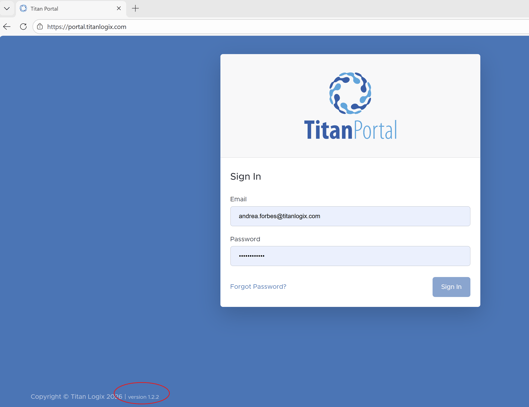
If you previously signed in to Titan Portal before our latest release (version 1.2.4), you may encounter issues logging in. You can confirm which version you’re using by checking the version number located at the bottom left corner of the Titan Portal page.
### **Solution:**
If you experience issues signing in to Titan Portal, start by clicking the “Refresh” button in your browser.
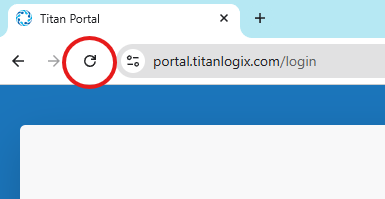
Once the page reloads, try signing in again—this should resolve the issue and allow you to access Titan Portal successfully.
### **Next Steps:**
Titan Logix will address this by automatically refreshing the Login page in the next Titan Portal release. Until then, manually refreshing the page as described above will resolve the issue.
---
**Need more help?**
Contact one of our Titan Logix's Service Team members for more technical assistance.
**Phone:** 1-877-462-4085 (ext. 2)
**Email:** [service@titanlogix.com](mailto:service@titanlogix.com)
**Request Training:** [Click Here](https://help.titanlogix.com/kb-tickets/new?hsLang=en)
- [Troubleshooting](https://help.titanlogix.com/troubleshooting?hsLang=en#main-content)
- [Error Codes](https://help.titanlogix.com/troubleshooting?hsLang=en#error-codes)
- [Overview](https://help.titanlogix.com/troubleshooting?hsLang=en#overview)
- [Most Common Issues](https://help.titanlogix.com/troubleshooting?hsLang=en#most-common-issues)
- [Alarms](https://help.titanlogix.com/troubleshooting?hsLang=en#alarms)
- [GAUGE Issues](https://help.titanlogix.com/troubleshooting?hsLang=en#gauge-issues)
- [Relays](https://help.titanlogix.com/troubleshooting?hsLang=en#relays)
- [FINCH III Systems (Current)](https://help.titanlogix.com/finch-iii-systems-current?hsLang=en#main-content)
- [FINCH III System Overview](https://help.titanlogix.com/finch-iii-systems-current?hsLang=en#finch-iii-system-overview)
- [Step 1: Installing Hardware (FINCH III Systems)](https://help.titanlogix.com/finch-iii-systems-current?hsLang=en#step-1-installing-hardware-finch-iii-systems)
- [Step 2: Configuring FINCH III Systems](https://help.titanlogix.com/finch-iii-systems-current?hsLang=en#step-2-configuring-finch-iii-systems)
- [Step 3: Testing FINCH III Systems](https://help.titanlogix.com/finch-iii-systems-current?hsLang=en#step-3-testing-finch-iii-systems)
- [Step 4: Operating FINCH III Systems](https://help.titanlogix.com/finch-iii-systems-current?hsLang=en#step-4-operating-finch-iii-systems)
- [Feature Add-On: FINCH III LCR.iQ Integration](https://help.titanlogix.com/finch-iii-systems-current?hsLang=en#feature-add-on-finch-iii-lcr-iq-integration)
- [Feature Add-On: FINCH III Terminal Overfill](https://help.titanlogix.com/finch-iii-systems-current?hsLang=en#feature-add-on-finch-iii-terminal-overfill)
- [Rack Control](https://help.titanlogix.com/finch-iii-systems-current?hsLang=en#rack-control)
- [Feature Add-On: Onboard Pump Control](https://help.titanlogix.com/finch-iii-systems-current?hsLang=en#feature-add-on-onboard-pump-control)
- [FINCH II-W/FINCH II-6W (End of Life)](https://help.titanlogix.com/finch-ii-w-finch-ii-6w-end-of-life?hsLang=en#main-content)
- [Step 1: Installing Hardware (FINCH II-W/6W Systems)](https://help.titanlogix.com/finch-ii-w-finch-ii-6w-end-of-life?hsLang=en#step-1-installing-hardware-finch-ii-w-6w-systems)
- [FINCH II-W/6W Wiring Diagrams](https://help.titanlogix.com/finch-ii-w-finch-ii-6w-end-of-life?hsLang=en#finch-ii-w-6w-wiring-diagrams)
- [Step 2: Configuring FINCH II-W/6W Systems](https://help.titanlogix.com/finch-ii-w-finch-ii-6w-end-of-life?hsLang=en#step-2-configuring-finch-ii-w-6w-systems)
- [3rd party integrations](https://help.titanlogix.com/finch-ii-w-finch-ii-6w-end-of-life?hsLang=en#3rd-party-integrations)
- [FINCH II, FINCH 5332E and FINCH IN-CAB Systems (Discontinued)](https://help.titanlogix.com/finch-ii-finch-5332e-and-finch-in-cab-systems-discontinued?hsLang=en#main-content)
- [FINCH II Display (1 to 2 Compartments)](https://help.titanlogix.com/finch-ii-finch-5332e-and-finch-in-cab-systems-discontinued?hsLang=en#finch-ii-display-1-to-2-compartments)
- [FINCH II Configuration](https://help.titanlogix.com/finch-ii-finch-5332e-and-finch-in-cab-systems-discontinued?hsLang=en#finch-ii-configuration)
- [FINCH 5332E](https://help.titanlogix.com/finch-ii-finch-5332e-and-finch-in-cab-systems-discontinued?hsLang=en#finch-5332e)
- [FINCH 5332E (Red Board)](https://help.titanlogix.com/finch-ii-finch-5332e-and-finch-in-cab-systems-discontinued?hsLang=en#finch-5332e-red-board)
- [FINCH 5332E (Green Board)](https://help.titanlogix.com/finch-ii-finch-5332e-and-finch-in-cab-systems-discontinued?hsLang=en#finch-5332e-green-board)
- [FINCH IN-CAB](https://help.titanlogix.com/finch-ii-finch-5332e-and-finch-in-cab-systems-discontinued?hsLang=en#finch-in-cab)
- [Rack Control Module (RCM) and Titan Supplied API Sockets](https://help.titanlogix.com/finch-ii-finch-5332e-and-finch-in-cab-systems-discontinued?hsLang=en#rack-control-module-rcm-and-titan-supplied-api-sockets)
- [Titan Supplied API Socket Wiring to RCM](https://help.titanlogix.com/finch-ii-finch-5332e-and-finch-in-cab-systems-discontinued?hsLang=en#titan-supplied-api-socket-wiring-to-rcm)
- [Transmitters](https://help.titanlogix.com/transmitters?hsLang=en#main-content)
- [TD100 Transmitter](https://help.titanlogix.com/transmitters?hsLang=en#td100-transmitter)
- [TD100 Transmitter: 4-20mA Output](https://help.titanlogix.com/transmitters?hsLang=en#td100-transmitter-4-20ma-output)
- [Upgrading TD80 \> TD100](https://help.titanlogix.com/transmitters?hsLang=en#upgrading-td80-td100)
- [TD80 (Discontinued)](https://help.titanlogix.com/transmitters?hsLang=en#td80-discontinued)
- [Titan Probes](https://help.titanlogix.com/titan-probes?hsLang=en#main-content)
- [Overview](https://help.titanlogix.com/titan-probes?hsLang=en#overview)
- [Probe: Dual Rod](https://help.titanlogix.com/titan-probes?hsLang=en#probe-dual-rod)
- [Probe: Coaxial](https://help.titanlogix.com/titan-probes?hsLang=en#probe-coaxial)
- [Titan Install & Titan Portal](https://help.titanlogix.com/titan-install-titan-portal?hsLang=en#main-content)
- [Step 1: Register your Company](https://help.titanlogix.com/titan-install-titan-portal?hsLang=en#step-1-register-your-company)
- [User Guide](https://help.titanlogix.com/titan-install-titan-portal?hsLang=en#user-guide)
- [Getting Started](https://help.titanlogix.com/titan-install-titan-portal?hsLang=en#getting-started)
- [Programming your Strapping Chart](https://help.titanlogix.com/titan-install-titan-portal?hsLang=en#programming-your-strapping-chart)
- [Maintenance and Troubleshooting](https://help.titanlogix.com/titan-install-titan-portal?hsLang=en#maintenance-and-troubleshooting)
- [FINCH Display Configuration](https://help.titanlogix.com/titan-install-titan-portal?hsLang=en#finch-display-configuration)
- [Release Notes](https://help.titanlogix.com/titan-install-titan-portal?hsLang=en#release-notes)
- [Administration](https://help.titanlogix.com/titan-install-titan-portal?hsLang=en#administration)
- [SensorLink](https://help.titanlogix.com/sensorlink?hsLang=en#main-content)
- [Overview](https://help.titanlogix.com/sensorlink?hsLang=en#overview)
- [Programming Your Transmitter](https://help.titanlogix.com/sensorlink?hsLang=en#programming-your-transmitter)
- [Configuring your FINCH Display](https://help.titanlogix.com/sensorlink?hsLang=en#configuring-your-finch-display)
- [Troubleshooting](https://help.titanlogix.com/sensorlink?hsLang=en#troubleshooting)
- [Upgrading Titan Products](https://help.titanlogix.com/upgrading-titan-products?hsLang=en#main-content)
- [Upgrade FINCH5332E -\> FINCH II - W or 6W](https://help.titanlogix.com/upgrading-titan-products?hsLang=en#upgrade-finch5332e-finch-ii-w-or-6w)
- [Adding Overfill Prevention to Your Tank](https://help.titanlogix.com/upgrading-titan-products?hsLang=en#adding-overfill-prevention-to-your-tank)
- [Legacy Products](https://help.titanlogix.com/legacy-products?hsLang=en#main-content)
- [Gateway](https://help.titanlogix.com/legacy-products?hsLang=en#gateway)
- [SFT 881](https://help.titanlogix.com/legacy-products?hsLang=en#sft-881)
- [Flo Pro 9100](https://help.titanlogix.com/legacy-products?hsLang=en#flo-pro-9100)
- [TPZ Liquid Level Measurement System](https://help.titanlogix.com/legacy-products?hsLang=en#tpz-liquid-level-measurement-system)
- [FGI Products](https://help.titanlogix.com/legacy-products?hsLang=en#fgi-products)
- [MIC 10](https://help.titanlogix.com/legacy-products?hsLang=en#mic-10)
- [Service Bulletins](https://help.titanlogix.com/service-bulletins?hsLang=en)
[](https://www.titanlogix.com/support/)
The Leader in Mobile Liquid Measurement Solutions
Copyright © 2026, Titan Logix Corp.