The 4 steps below is a high-level breakdown of the order you go through from installing a system on a tank to operating the unit.

Review the steps below to complete Step 1: Install Hardware
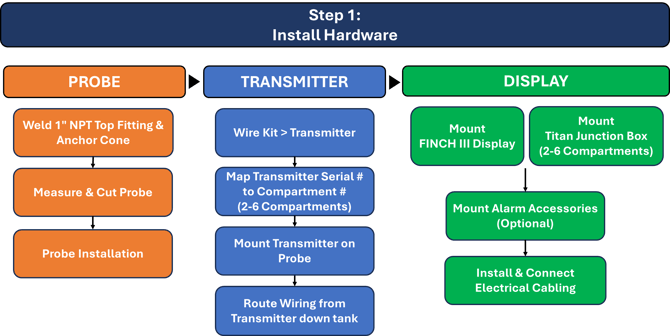

1. Installation: PROBE
The following videos walk you through the steps to install your Titan Logix probe inside each compartment.

Note: This is the same process for both FINCH II and FINCH III systems.


Dual Rod Probe Instructions
ClearView Probe Instructions

Note: This is the same process for both FINCH II and FINCH III
(Video coming soon)

2. Installation: TRANSMITTER
The following videos walk you through the steps to install and wire your transmitters.

Note: This is the same process for both the Blue and Red lid TD100 Transmitters.

(Video coming soon)

Note: This is the same process for both the Blue and Red lid TD100 Transmitters.

Note: This is the same process for both FINCH II and FINCH III. These wires will either go straight to the FINCH III display (1 comp units) or to your Titan Junction Box (2 -6 comp units)

3. Installation: FINCH III DISPLAY
The following videos walk you through the steps to mount and wire your FINCH III display.

(Video coming soon)

(Video coming soon)

(Video coming soon)

(Video coming soon)
Need more help?
Contact one of our Titan Logix's Service Team members for more technical assistance.
Phone: 1-877-462-4085 (ext. 2)
Email: service@titanlogix.com
Request Training: Click Here