---
title: ClearView Probe Installation
description: ClearView probes require to be cut to fit the inside of your tank by first cutting the outer tube, and then cutting t
---
[Skip to content](https://help.titanlogix.com/how-to-cut-a-clearview-probe#main-content)
English
Show submenu for translations
[Training Request Form](https://help.titanlogix.com/kb-tickets/new?hsLang=en)
Open main navigation
Close main navigation
- English
Show submenu for translations
- [Training Request Form](https://help.titanlogix.com/kb-tickets/new)
- www.titanlogix.com
www.titanlogix.com
How can we help you?
- There are no suggestions because the search field is empty.
1. [Titan Help Center](https://help.titanlogix.com/?hsLang=en)
2. [FINCH III Systems (Current)](https://help.titanlogix.com/finch-iii-systems-current?hsLang=en)
3. [Step 1: Installing Hardware (FINCH III Systems)](https://help.titanlogix.com/finch-iii-systems-current?hsLang=en#step-1-installing-hardware-finch-iii-systems)
# ClearView Probe Installation
Titan Logix’s probes are shipped longer than required to fit all tank installations. Our ClearView probes are 8ft (96in) long, and you will need to cut them down to fit the inside of your tank.
Our ClearView Probe is **ONLY** compatible with our FINCH III display.
Your probe ships with a protective cap included on the top of the probe. Ensure that the top of the probe is covered by the protective cap it is shipped with. This cap must remain in place until the transmitter is mounted on the probe to protect the probe from dirt, oil, and physical damage.
The following parts are shipped with the ClearView probe:
1. ClearView Probe
2. Teflon Spacer
3. End Cap
Contact Titan Logix if any parts are missing or have been damaged during shipment.
**⭐IMPORTANT:**
**-png.png?width=541&height=138&name=Copy%20of%20Copy%20of%20Copy%20of%20Finch%202%20User%20Decal%20(1)-png.png)**
- The Teflon Spacer (image in the middle) is required to stabilize the center rod and must be installed prior to applying the End Cap.
- The End Cap (image on the right) is required for the probe to accurately measure fluid to the bottom of the probe and must be in place prior to the probe being installed in the tank.
### 🛠️Tools Required
- Tube Cutter
- Pipe Cutter
- Measuring Tape
- 1 3/4" wrench
- Teflon Tape
### Installation Process
The ClearView probe installation steps once the proper length of the probe has been determined based on your tank dimensions.
- **Step 1 -** Determine Probe Length
- **Step 2 -** Cut Probe
- **Step 3 -** Install Spacer
- **Step 4 -** Cut Center Rod
- **Step 5 -** Install End Cap
- **Step 6 -** Insert Probe into Tank Compartment
#### **Step 1 - Determine Probe Length**
**NOTE**
The ClearView probe will measure volume as soon as the fluid touches the bottom of the probe. If the fluid is below the probe the FINCH will display 2LO. It is important that the probe is cut to the correct length to get an accurate measurement of retained fluid.
**1.** Measure the height of your tank compartment from the bottom of the tank, inside the anchor cone to the top edge of the 1” NPT top fitting.
**2.** Measure this height on the probe, starting at the **bottom of the probe nut** to the end of the ClearView probe tube.

**2.** Subtract around 3/4 of an inch from this measurement. Mark the outer tube with this measurement.
**Tip:** Measure twice to make sure.
#### **Step 2 - Cut Tube**
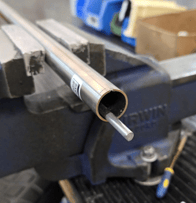
**4.** Use a tube cutter to cut the outer tube of the probe where you marked the height. Apply light pressure when using a tube cutter to minimize tube deformation.
**5.** Debur the inside of the tube, as shown in below image, to ensure any excess material is removed before installing the Teflon Spacer.
#### **Step 3 - Install Spacer**
**6.** Insert the **Teflon Spacer** onto the probe in the center of the tube.
**7.** Push the Teflon Spacer to be slightly inside the tube, as shown in the image below.

#### **Step 4 - Cut Probe**
**8.** Cut the probe flush with end of the tube, as shown in image below.

**9.** Debur probe, as shown in image below.

#### **Step 5 - Install End Cap**
**11.** Push the end cap onto the center probe until it is firmly seated, as shown in image below.
**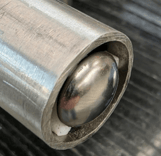**
**12.** When properly installed, the crown of the end cap will extend slightly beyond the end of the outer tube.
The ClearView probe is now ready for installing inside the tank compartment.
#### **Step 6 - Insert Probe into Tank Compartment**
**13.** Apply Teflon tape to the 1" NPT threads that mate with the top fitting.
**14.** Once the probe is cut to fit inside the tank, carefully insert the probe through the top fitting, resting the shorting block inside the anchor cone.
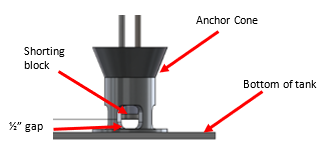
**15.** Ensure there is a **½” gap** between the **bottom of the tank (or anchor cone)** and the bottom of the probe.
**16.** Hand tighten the probe into the top fitting, then finish tightening with a 1 3/4" wrench.
**TIP:**
Make sure the probe is not bended or twisted once it has been installed.
---
**Need more help?**
Contact one of our Titan Logix's Service Team members for more technical assistance.
**Phone:** 1-877-462-4085 (ext. 2)
**Email:** [service@titanlogix.com](mailto:service@titanlogix.com)
**Request Training:** [Click Here](https://help.titanlogix.com/kb-tickets/new?hsLang=en)
- [Troubleshooting](https://help.titanlogix.com/troubleshooting?hsLang=en#main-content)
- [Error Codes](https://help.titanlogix.com/troubleshooting?hsLang=en#error-codes)
- [Overview](https://help.titanlogix.com/troubleshooting?hsLang=en#overview)
- [Most Common Issues](https://help.titanlogix.com/troubleshooting?hsLang=en#most-common-issues)
- [Alarms](https://help.titanlogix.com/troubleshooting?hsLang=en#alarms)
- [GAUGE Issues](https://help.titanlogix.com/troubleshooting?hsLang=en#gauge-issues)
- [Relays](https://help.titanlogix.com/troubleshooting?hsLang=en#relays)
- [FINCH III Systems (Current)](https://help.titanlogix.com/finch-iii-systems-current?hsLang=en#main-content)
- [FINCH III System Overview](https://help.titanlogix.com/finch-iii-systems-current?hsLang=en#finch-iii-system-overview)
- [Step 1: Installing Hardware (FINCH III Systems)](https://help.titanlogix.com/finch-iii-systems-current?hsLang=en#step-1-installing-hardware-finch-iii-systems)
- [Step 2: Configuring FINCH III Systems](https://help.titanlogix.com/finch-iii-systems-current?hsLang=en#step-2-configuring-finch-iii-systems)
- [Step 3: Testing FINCH III Systems](https://help.titanlogix.com/finch-iii-systems-current?hsLang=en#step-3-testing-finch-iii-systems)
- [Step 4: Operating FINCH III Systems](https://help.titanlogix.com/finch-iii-systems-current?hsLang=en#step-4-operating-finch-iii-systems)
- [Feature Add-On: FINCH III LCR.iQ Integration](https://help.titanlogix.com/finch-iii-systems-current?hsLang=en#feature-add-on-finch-iii-lcr-iq-integration)
- [Feature Add-On: FINCH III Terminal Overfill](https://help.titanlogix.com/finch-iii-systems-current?hsLang=en#feature-add-on-finch-iii-terminal-overfill)
- [Rack Control](https://help.titanlogix.com/finch-iii-systems-current?hsLang=en#rack-control)
- [Feature Add-On: Onboard Pump Control](https://help.titanlogix.com/finch-iii-systems-current?hsLang=en#feature-add-on-onboard-pump-control)
- [FINCH II-W/FINCH II-6W (End of Life)](https://help.titanlogix.com/finch-ii-w-finch-ii-6w-end-of-life?hsLang=en#main-content)
- [Step 1: Installing Hardware (FINCH II-W/6W Systems)](https://help.titanlogix.com/finch-ii-w-finch-ii-6w-end-of-life?hsLang=en#step-1-installing-hardware-finch-ii-w-6w-systems)
- [FINCH II-W/6W Wiring Diagrams](https://help.titanlogix.com/finch-ii-w-finch-ii-6w-end-of-life?hsLang=en#finch-ii-w-6w-wiring-diagrams)
- [Step 2: Configuring FINCH II-W/6W Systems](https://help.titanlogix.com/finch-ii-w-finch-ii-6w-end-of-life?hsLang=en#step-2-configuring-finch-ii-w-6w-systems)
- [3rd party integrations](https://help.titanlogix.com/finch-ii-w-finch-ii-6w-end-of-life?hsLang=en#3rd-party-integrations)
- [FINCH II, FINCH 5332E and FINCH IN-CAB Systems (Discontinued)](https://help.titanlogix.com/finch-ii-finch-5332e-and-finch-in-cab-systems-discontinued?hsLang=en#main-content)
- [FINCH II Display (1 to 2 Compartments)](https://help.titanlogix.com/finch-ii-finch-5332e-and-finch-in-cab-systems-discontinued?hsLang=en#finch-ii-display-1-to-2-compartments)
- [FINCH II Configuration](https://help.titanlogix.com/finch-ii-finch-5332e-and-finch-in-cab-systems-discontinued?hsLang=en#finch-ii-configuration)
- [FINCH 5332E](https://help.titanlogix.com/finch-ii-finch-5332e-and-finch-in-cab-systems-discontinued?hsLang=en#finch-5332e)
- [FINCH 5332E (Red Board)](https://help.titanlogix.com/finch-ii-finch-5332e-and-finch-in-cab-systems-discontinued?hsLang=en#finch-5332e-red-board)
- [FINCH 5332E (Green Board)](https://help.titanlogix.com/finch-ii-finch-5332e-and-finch-in-cab-systems-discontinued?hsLang=en#finch-5332e-green-board)
- [FINCH IN-CAB](https://help.titanlogix.com/finch-ii-finch-5332e-and-finch-in-cab-systems-discontinued?hsLang=en#finch-in-cab)
- [Rack Control Module (RCM) and Titan Supplied API Sockets](https://help.titanlogix.com/finch-ii-finch-5332e-and-finch-in-cab-systems-discontinued?hsLang=en#rack-control-module-rcm-and-titan-supplied-api-sockets)
- [Titan Supplied API Socket Wiring to RCM](https://help.titanlogix.com/finch-ii-finch-5332e-and-finch-in-cab-systems-discontinued?hsLang=en#titan-supplied-api-socket-wiring-to-rcm)
- [Transmitters](https://help.titanlogix.com/transmitters?hsLang=en#main-content)
- [TD100 Transmitter](https://help.titanlogix.com/transmitters?hsLang=en#td100-transmitter)
- [TD100 Transmitter: 4-20mA Output](https://help.titanlogix.com/transmitters?hsLang=en#td100-transmitter-4-20ma-output)
- [Upgrading TD80 \> TD100](https://help.titanlogix.com/transmitters?hsLang=en#upgrading-td80-td100)
- [TD80 (Discontinued)](https://help.titanlogix.com/transmitters?hsLang=en#td80-discontinued)
- [Titan Probes](https://help.titanlogix.com/titan-probes?hsLang=en#main-content)
- [Overview](https://help.titanlogix.com/titan-probes?hsLang=en#overview)
- [Probe: Dual Rod](https://help.titanlogix.com/titan-probes?hsLang=en#probe-dual-rod)
- [Probe: Coaxial](https://help.titanlogix.com/titan-probes?hsLang=en#probe-coaxial)
- [Titan Install & Titan Portal](https://help.titanlogix.com/titan-install-titan-portal?hsLang=en#main-content)
- [Step 1: Register your Company](https://help.titanlogix.com/titan-install-titan-portal?hsLang=en#step-1-register-your-company)
- [User Guide](https://help.titanlogix.com/titan-install-titan-portal?hsLang=en#user-guide)
- [Getting Started](https://help.titanlogix.com/titan-install-titan-portal?hsLang=en#getting-started)
- [Programming your Strapping Chart](https://help.titanlogix.com/titan-install-titan-portal?hsLang=en#programming-your-strapping-chart)
- [Maintenance and Troubleshooting](https://help.titanlogix.com/titan-install-titan-portal?hsLang=en#maintenance-and-troubleshooting)
- [FINCH Display Configuration](https://help.titanlogix.com/titan-install-titan-portal?hsLang=en#finch-display-configuration)
- [Release Notes](https://help.titanlogix.com/titan-install-titan-portal?hsLang=en#release-notes)
- [Administration](https://help.titanlogix.com/titan-install-titan-portal?hsLang=en#administration)
- [SensorLink](https://help.titanlogix.com/sensorlink?hsLang=en#main-content)
- [Overview](https://help.titanlogix.com/sensorlink?hsLang=en#overview)
- [Programming Your Transmitter](https://help.titanlogix.com/sensorlink?hsLang=en#programming-your-transmitter)
- [Configuring your FINCH Display](https://help.titanlogix.com/sensorlink?hsLang=en#configuring-your-finch-display)
- [Troubleshooting](https://help.titanlogix.com/sensorlink?hsLang=en#troubleshooting)
- [Upgrading Titan Products](https://help.titanlogix.com/upgrading-titan-products?hsLang=en#main-content)
- [Upgrade FINCH5332E -\> FINCH II - W or 6W](https://help.titanlogix.com/upgrading-titan-products?hsLang=en#upgrade-finch5332e-finch-ii-w-or-6w)
- [Adding Overfill Prevention to Your Tank](https://help.titanlogix.com/upgrading-titan-products?hsLang=en#adding-overfill-prevention-to-your-tank)
- [Legacy Products](https://help.titanlogix.com/legacy-products?hsLang=en#main-content)
- [Gateway](https://help.titanlogix.com/legacy-products?hsLang=en#gateway)
- [SFT 881](https://help.titanlogix.com/legacy-products?hsLang=en#sft-881)
- [Flo Pro 9100](https://help.titanlogix.com/legacy-products?hsLang=en#flo-pro-9100)
- [TPZ Liquid Level Measurement System](https://help.titanlogix.com/legacy-products?hsLang=en#tpz-liquid-level-measurement-system)
- [FGI Products](https://help.titanlogix.com/legacy-products?hsLang=en#fgi-products)
- [MIC 10](https://help.titanlogix.com/legacy-products?hsLang=en#mic-10)
- [Service Bulletins](https://help.titanlogix.com/service-bulletins?hsLang=en)
[](https://www.titanlogix.com/support/)
The Leader in Mobile Liquid Measurement Solutions
Copyright © 2026, Titan Logix Corp.