Overview
The FINCH 5332E (Red Board) was designed to work with Titan Logix’s legacy Optical Rack Control product, the Rack Interface Module P2000A.
The FINCH 5332E (Red Board) also includes a Class 1 Division 2 rated soft power switch feature, allowing the FINCH board to be powered on using the front switch.
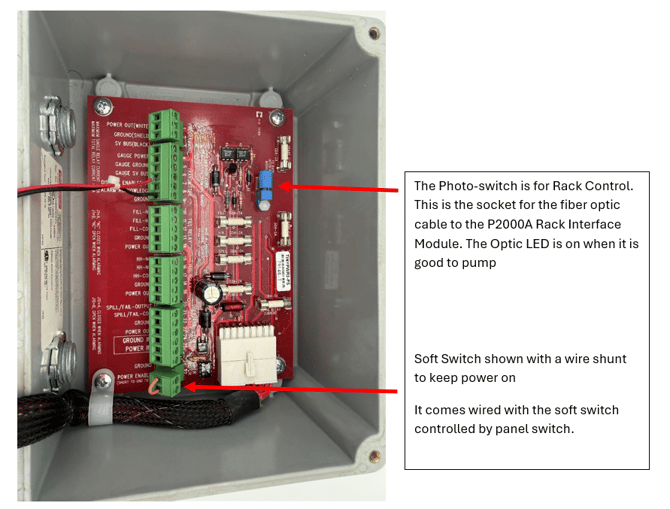
Soft Power Switch
The soft switch terminals labeled Power Enable and Ground must be electrically connected in order for the unit to power on.
This connection can be achieved using:
- A physical switch
- A direct wire jumper connection
- 1 × Spare 2A Sand-Filled Fuse
- 1 × Spare 5A Sand-Filled Fuse
Alternatively, the front switch can be configured to control the Display Enable (PTO) function.
Photo Switch Function
The photo switch installed on the red board is designed to connect via fiber optic cable to the Rack Interface Module. Model: P2000A
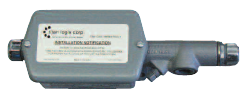
Rack Interface Module
Model: P2000A
This legacy optical rack control system was later phased out and replaced by Titan Logix’s newer Rack Control Module, which is now incorporated within our FINCH III display. CLICK HERE to learn more. 😎
Fuse Protection
The FINCH 5332E (Red Board) contains five sand-filled fuses used for power and relay protection.
INCLUDE IMAGE HERE😎
|
Fuse |
Function |
Rating |
Installed On |
|
F1 |
Power Protection |
2A |
— |
|
F2 |
Total Relay Current Protection |
5A |
— |
|
F3 |
FILL Relay Protection |
2A |
FILL-COM |
|
F4 |
High-High (HH) Relay Protection |
2A |
HH-COM |
|
F5 |
SPILL Relay Protection |
2A |
SPILL/FAIL-COM |
Spare Fuses
The onboard electronics on the FINCH 5332E (Red Board) provide control power for the photo switch circuitry.
This circuitry also enables onboard system power control through the integrated soft power switch design.
Need more help?
Contact one of our Titan Logix's Service Team members for more technical assistance.
Phone: 1-877-462-4085 (ext. 2)
Email: service@titanlogix.com
Request Training: Click Here